
Search

Sign In Join Free


1 / 1
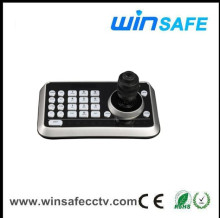
Multi Protocols Keyboard PTZ Controller
Get Latest Price
You might also like



Basic Info
| Model No. | WS-M131S |
|---|
Product description
Feature
Set the address range of the MS series camera and
Ecoder: 0-255
Directly control speed dome camera on OSD menu
Operate the pan/tilt of speed dome camera to move in different speed level
Initial setting are subjuect to change through the speed dome camera menu
Manually control the Focus/Zoom/Iris of the camera
Manually control the Playback/Pause/East Playback/Forward Backwards/Menu1, 4, 9, 16 screen view/search of the DVR
LED Display
RS-485 multi protocols communication
Power Input DC 12V
Set the address range of the MS series camera and
Ecoder: 0-255
Directly control speed dome camera on OSD menu
Operate the pan/tilt of speed dome camera to move in different speed level
Initial setting are subjuect to change through the speed dome camera menu
Manually control the Focus/Zoom/Iris of the camera
Manually control the Playback/Pause/East Playback/Forward Backwards/Menu1, 4, 9, 16 screen view/search of the DVR
LED Display
RS-485 multi protocols communication
Power Input DC 12V
Multi Protocols Keyboard PTZ Controller
Get Latest Price
Send your inquiry to this supplier
You may also be interested in
Product Categories
New products




Send Inquiry
Product Alert
Subscribe to your interested keywords. We will send freely the latest and hottest products to your Inbox. Don't miss any trade information.
Subscribe
Your use of this website constitutes acknowledgement and acceptance of our Terms & Conditions.
Copyright ? 2009-2026 Bossgoo Co., Ltd. All rights reserved.
